ProPR Lens
ProPR in your browser.
ProPR Lens is a free browser extension for Chrome and Firefox. It shows ProPR's review of the open pull request in a panel beside the page.
The review beside the pull request
ProPR Lens shows ProPR’s review of the pull request in the current tab. It works on the pull request pages of Azure DevOps, GitHub, GitLab and Forgejo-family hosts, including self-managed installations. In Chrome, a status badge on the pull request page opens the side panel. In Firefox, you open the sidebar from the toolbar or with Alt+Shift+P, and the sidebar follows the active pull request tab.
- The panel groups the findings by file, and you can filter them by severity or search them.
- You see the review status, earlier reviews, token usage and the estimated cost.
- While ProPR works on a review, the panel follows its progress.
- Jump to comment scrolls the pull request page to the comment of a finding.
If your ProPR role permits it, you can request a review, restart a review or dismiss a finding in the panel. ProPR Lens leaves the comments and badges that ProPR posts on the pull request unchanged.
Requirements
ProPR Lens connects to a ProPR installation that uses HTTPS and has browser sign-in for ProPR Lens enabled. You need a personal account on that installation. The hosted offering supports ProPR Lens. On a self-hosted installation, the operator enables browser sign-in.
The extension runs in Chrome 116 or later and in other Chromium browsers that install extensions from the Chrome Web Store. In Firefox, it needs version 140 or later on the desktop.
Installation
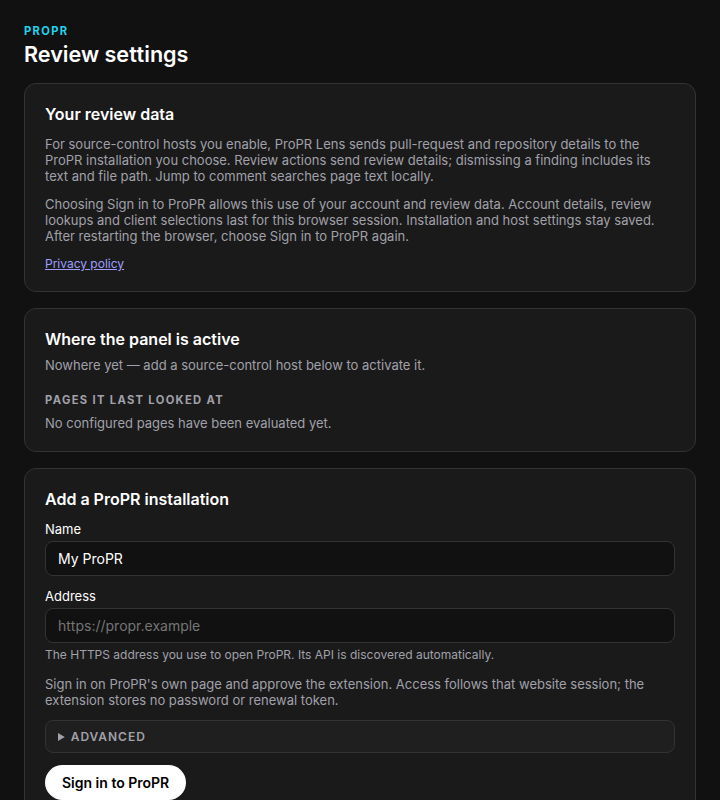
Install ProPR Lens from the Chrome Web Store or from Firefox Add-ons. The extension is free. In the extension settings, enter the HTTPS address that you use to open ProPR and choose Sign in to ProPR. You sign in on the ProPR website and approve the extension there. Then add the source-control hosts that your installation reviews. ProPR Lens requests browser access to the ProPR installation when you add the installation, and to each source-control host when you add the host.
Sign-in and data
ProPR Lens holds short-lived access for the browser session and stores no password, personal access token or refresh token. After a browser restart, you choose Sign in to ProPR again. ProPR runs the reviews, and the extension contains no AI review engine. It contains no analytics or advertising tracking.
The data that ProPR Lens exchanges with your ProPR installation is described in the privacy policy.